
DSC-BRAIN USER GUIDE · SETTINGS REFERENCE
Settings — how the settings pages work
The rail, search, scope badges (browser / brain / hub / firmware), default chips, reset, changed-at, drawers, and the settings change log.
● verified for 9.0.0 · corrected for 9.8.9 on 2026-10-01
● first mirrored 2026-09-15
On this page
Layout
To find a setting by name, type it in the search box above the rail: it matches the row label, its entity id or a synonym and jumps to the row. This guide always writes where a setting lives as Settings › Section › Card, for example Settings › Alerts › Delivery, and each section has its own page (see the Settings reference).
Settings opens a page with a rail of twelve sections on the left, grouped by the question you are asking, never by which process stores the answer. The selected section is filled, and a short live status line can show under a section name. On a screen narrower than 900 pixels the rail becomes a strip across the top that scrolls sideways, and each section is a real link you can open in a new tab:
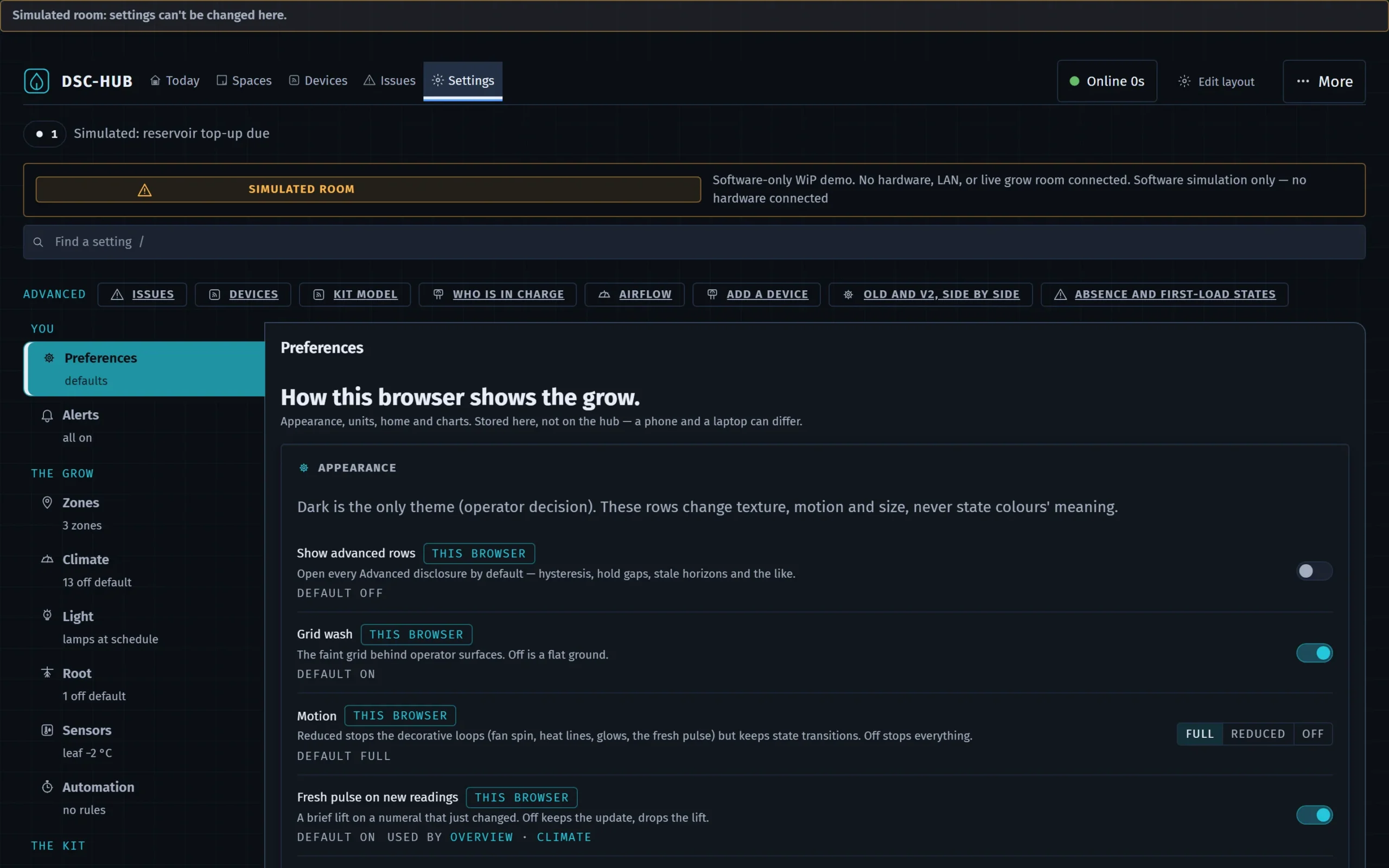
- You: Preferences, Alerts
- The grow: Zones, Climate, Light, Root, Sensors, Automation
- The kit: Devices, Integrations, Network, System
Depth is capped at rail → section → drawer. A search box above the rail finds any row by label, entity id or synonym and jumps to it; every row has an anchor so links from the desks land on the right card. Above the search, an Advanced row lists the newer screens that have no item of their own, such as Who is in charge and Kit model; each shows only while its screen is on.
Every row tells you where it lives
A scope badge on each row:
| Badge | Stored | Means |
|---|---|---|
| Browser | This browser only | A phone and a laptop can differ. Cleared by Reset this browser's preferences. |
| Brain | The Pi's settings database | Shared by every browser; included in backups and setup profiles. |
| Hub | Desired value on the brain, applied to the hub | Shows a sync state: SYNCED, PENDING (write in flight), HELD (hub offline, will apply on reconnect), HUB DIFFERS (someone changed it on the hub side; the brain never silently overwrites that). |
| Firmware | Compiled into the device | Read-only here; changing it means a reflash. |
Rows also show a default chip (click to see the default), a reset control, changed at (who and when, from the settings change log), and consumers — which desks read this value.
Advanced rows
Rows that only matter if you know why (hysteresis, ladder waits, clamps, hold gaps) sit in an Advanced disclosure at the foot of their card; open it to see them. Show advanced rows under Settings › Preferences opens every Advanced disclosure by default, and a deep link to an advanced row opens its disclosure.
INVENTED rows
A row for something the software knows about but the rig cannot do (people and roles, for example) renders dashed with a possible with… hint, never as a dead toggle. Hidden unless Settings › System › Developer › Show INVENTED rows is on.
Drawers
Devices and Zigbee bindings open in a slide-in drawer with its own Save and a discard guard if you close with unsaved changes.
Writes and the change log
Every setting write is journaled (Settings › System › Developer › Settings change log, and Logs › Settings changes). Hub-scoped writes report saving… → saved on hub or not applied — still X (reason).
Units
The dashboard is metric. Temperature is shown in °C; Fahrenheit is not displayed yet. Conductivity and airflow scales are yours to pick.
DSC-Brain user guide · Settings — how the settings pages work · this page is edited on the site; the Notion original was retired after the mirror