
DSC-BRAIN USER GUIDE · USING THE DASHBOARD
Today
The landing desk: mission line, one card per zone, kit pulse and what each chip on a zone card means. Formerly the Overview desk; the address is still #/overview.
● verified for 9.0.0 · corrected for 9.8.9 on 2026-10-01
● first mirrored 2026-09-15
On this page
One room breathes for every tent. This rig runs two.
Today answers one question: does anything need me right now? Read the mission line first, then the zone cards, and click a card to go to the screen that owns the detail. With the five-item bar, Today is where the app opens, and the Landing desk row under Settings › Preferences no longer applies. It is a read-mostly summary.
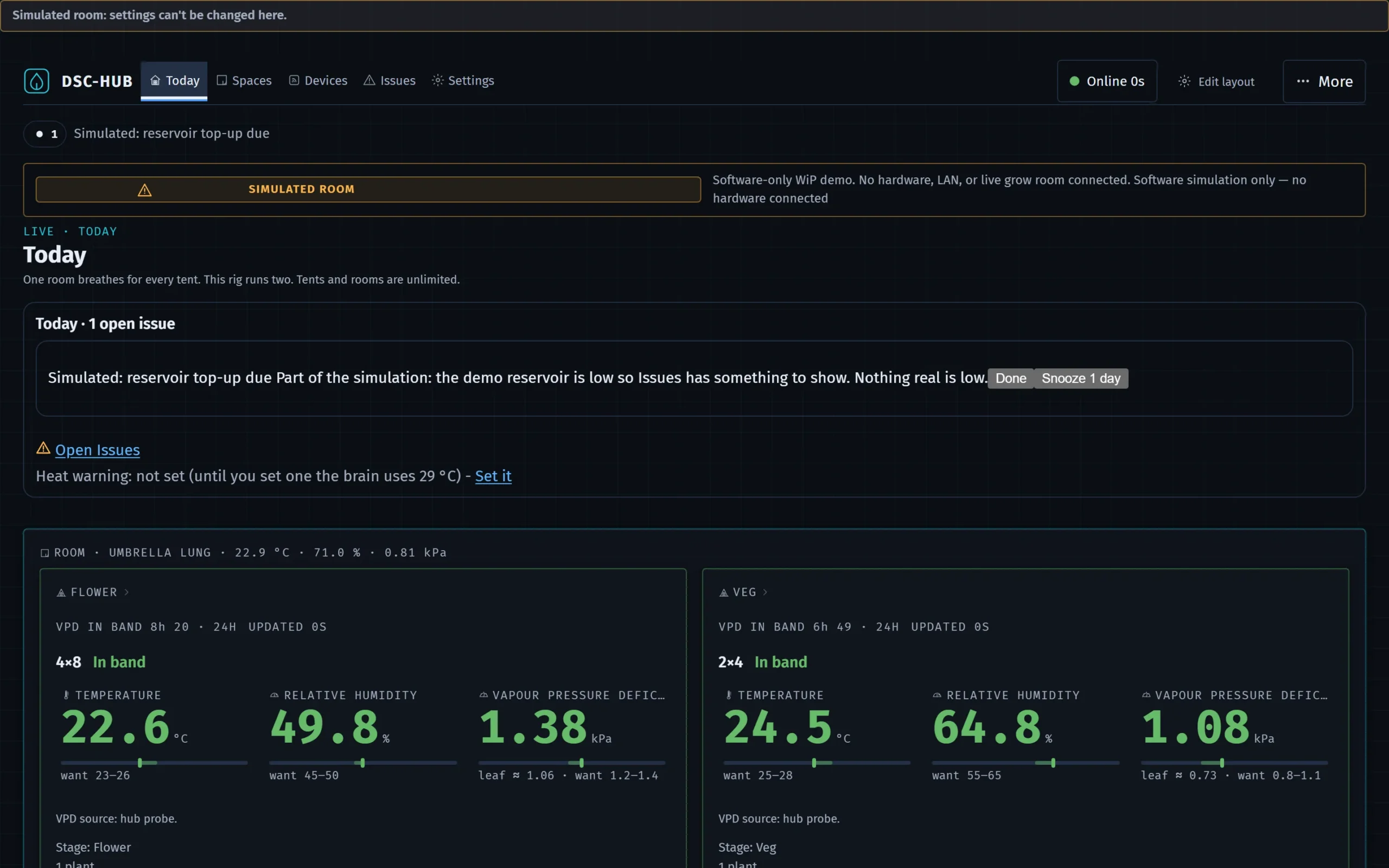
Three things are new on Today. The Today band lists what needs a hand, worst first and five lines at most, under a heading that reads Today and the number of open issues; the rest are one click away in Issues. If the issue list is unavailable, the heading says so, and that is not an all-clear. The Overnight panel gives the last dark period for each space: the lowest and highest temperature, humidity and VPD, the peak humidity and the minutes over band. A figure the brain cannot work out reads unavailable, with the reason, never zero. Whether the dark held needs two observers that agree; with one it reads unknown. A Why panel shows what the planner worked out and why. The planner works out its plans alongside; the hub's own control still runs the room.
Mission line
One sentence at the top that says what matters right now. Critical banners and critical alerts come first (N critical alerts active). With none, warn-tier alerts are listed (N alerts to look at). With no alert active it names the last notable grow-log event as a past notable, not a live alert, or reads All in band. Turn it off under Settings › Preferences › Status line on Overview.
Pre-harvest card: above the mission line, from flower day 35 of any flowering plant; before then it shows nothing. Its title is Harvest in about N days: 5 checks, where N is the days left to the earliest finish the strain's catalog flowering time gives, or Harvest preparation: 5 checks when no strain gives one. Under the title it reads the flower day, then Harvest by the trichomes, not the date. and how many of the 5 checks still need you. Each check carries a DONE, TO DO or UNKNOWN tag and the reason. An unknown stays unknown: a missing reading or observer never turns into a tick. The five checks:
- Trichomes looked at (photo and a pick): the tent's latest camera frame when there is one, a pick of what you see, and Save trichome check. It is done when a trichome check was saved in the last 3 days.
- Lights-off RH trend (automatic): the mean RH over the last 3 days while the lamp was recorded off. It is recorded for the 4×8 only; anywhere else, or with no readings, it reads UNKNOWN and says why.
- Dry location ready (automatic): you pick the dry space, and the card lists anything that stops it (for example a lit run that needs it) and what is still unknown.
- Dark-lock test (one tap, supervised): Run the dark-lock test checks that the software refuses a lamp-on command for the dry space, and sends no lamp command. You then say what you saw: Yes, it stayed dark or No, I saw light. It passes only once a dry run is holding that space dark.
- Scale and jars ready: two ticks, Scale ready for the wet weight and Jars, packs and a jar hygrometer ready. Each tick counts only when the brain reads it back.
Zone cards
A ROOM · UMBRELLA LUNG panel carries the room's temperature, RH and VPD in its title and wraps one card per tent (4×8, 2×4). The tags in the page header show the hub beat (BEAT #, opens Kit), uptime, a HELD tag for each zone with a frozen reading, the canopy binding (CANOPY ← role, or CANOPY UNBOUND, which opens Settings › Devices › Zigbee) and the critical or warn count. Each tent card shows:
- Temperature, RH, VPD (click one for its chart) with a Want tag that names its basis (PLANT BAND, STAGE BAND or WANT) and, in the title line, VPD IN BAND with a fraction and 24H (VPD IN BAND — when there is no figure, and VPD: no want set when the tent has no Want band). A held reading is labelled HELD.
- State word beside the tent name, one of six, judged from the temperature, RH and VPD the card shows against the band the card shows. In band: every live reading is inside its band. Off want: at least one reading is outside its band. Far off want: at least one is well outside it. Held: a reading is frozen at its last good value, so the card does not call the tent in or out of band. No reading: none of the three has a live value. No want set: the readings are live but no band is set to compare them with. Held, No reading and No want set are grey words: they mean unknown, never fine.
- Stage and day in the title, written like FLOWER DAY 34 followed by the days since sprout (the day a stage starts is day 1; when the stage day is not known it reads DAY UNKNOWN), and a STAGE · HUB … · PLANTS … tag when the hub's stage select and the plants' expected stage disagree.
- Derived tags: VPD vs band, dew point, condensation margin, DLI and CO₂. A dashed tag names the missing input instead of showing a zero.
- FINISH: the latest expected finish among the tent's plants, from the catalog flowering time (an estimate). It turns amber once the window has passed and opens the tent cockpit.
- Appliance, lamp and probe tags: each appliance's demand (opens Climate), the lamp with brightness and, where known, PPFD and DLI (opens Light), and one tag per probe with its plant and moisture (opens Root). The lamp tag's hover says whether PPFD comes from the fixture's maker map or the SF1000 calibration.
- Camera thumbnail if a camera is bound to the zone (refresh rate under Settings › Preferences). Click for the viewer and timelapse.
- LAMP ON · ROLE NOT ENFORCED when the zone's role is not a grow role and its lamp is on (a role flip does not switch the lamp yet).
Click a card's title to open that tent's cockpit (Climate › Tent); click temperature, RH or VPD to open its chart. To read a VPD against what each stage wants, use the VPD chart by growth stage.
Fan duties, two clocks and the twin
FAN DUTIES · THE LUNG, IN PERCENTAGES draws one bar per fan with a fan glyph spinning at duty; a known fan that nothing reads shows its assumed duty with a ? and does not spin. A bar opens Climate. TWO DESKS, TWO CLOCKS shows each tent's photoperiod window with DARK PERIOD OK or DARK PERIOD BROKEN. Both panels carry an in twin link that opens the Twin desk in the Air or Light lens. Below them, 3D TWIN · CLIMATE stays unloaded until you press Show the room in 3D, so the page stays light. The foot line gives the firmware the devices report and compares it with the release train: Firmware <version> (matches the release train), (newer than the release train <version>), or (older than the release train <version>: an update is due). Only a device older than the release train reads as an update due.
Grow log teaser
GROW LOG lists up to six events from the last 24 h, newest first; an event with a playbook links to it, and Open Logs → opens the full journal browser. Overview never shows trends; those live on Logs.
What Overview does not do
- It has no controls for your appliances or lamps. The one thing you can do here is answer the pre-harvest card's checks, which save what you tell us and switch nothing. Everything else actionable is on the owning desk.
- It does not show every issue; the Issues screen does.
DSC-Brain user guide · Today · this page is edited on the site; the Notion original was retired after the mirror