
DSC-BRAIN USER GUIDE · USING THE DASHBOARD
Twin desk (3D room)
The room live in 3D: lenses and layers, camera and looks, the phone still and 2D plan, picking and control, what-if and proposals, replay, placements, the measured room, runs and layout drafts. In 9.8.9 Twin opens from the More button, from the Plants segment of Spaces (as 3D view) and from a space page (3D view).
● verified for 9.0.0 · corrected for 9.8.9 on 2026-10-01
● first mirrored 2026-09-15
The room, live. The Twin is a view of zone state, never a data source. If a value is held or missing on Climate, it is held or missing here.
Use the Twin to see the room in 3D, click a device for its state, preview a change without writing it (what-if), replay the recorded twin, and set where things stand in the scene.
Layers
| Layer | Shows |
|---|---|
| Air | Duct routes and streaks: count by duty, speed by learned CFM |
| Heat | Zone volume tinted against its Want band; shimmer over heaters and the mat |
| Humidity | Haze density by RH, tone by band; mist while a humidifier runs; red near dew point |
| Light | Lamp cones by brightness, footprint at the canopy plane |
| Plants | Every roster plant in place: pot to vessel, canopy to stage |
| Devices | Fans, appliances, sensors and the hub at their anchors; placed Zigbee sensors as markers |
| Labels | Zone readouts, plant tags, hover names |
| Bindings | Marks every model instance nothing live is driving: unbound, no data or missing |
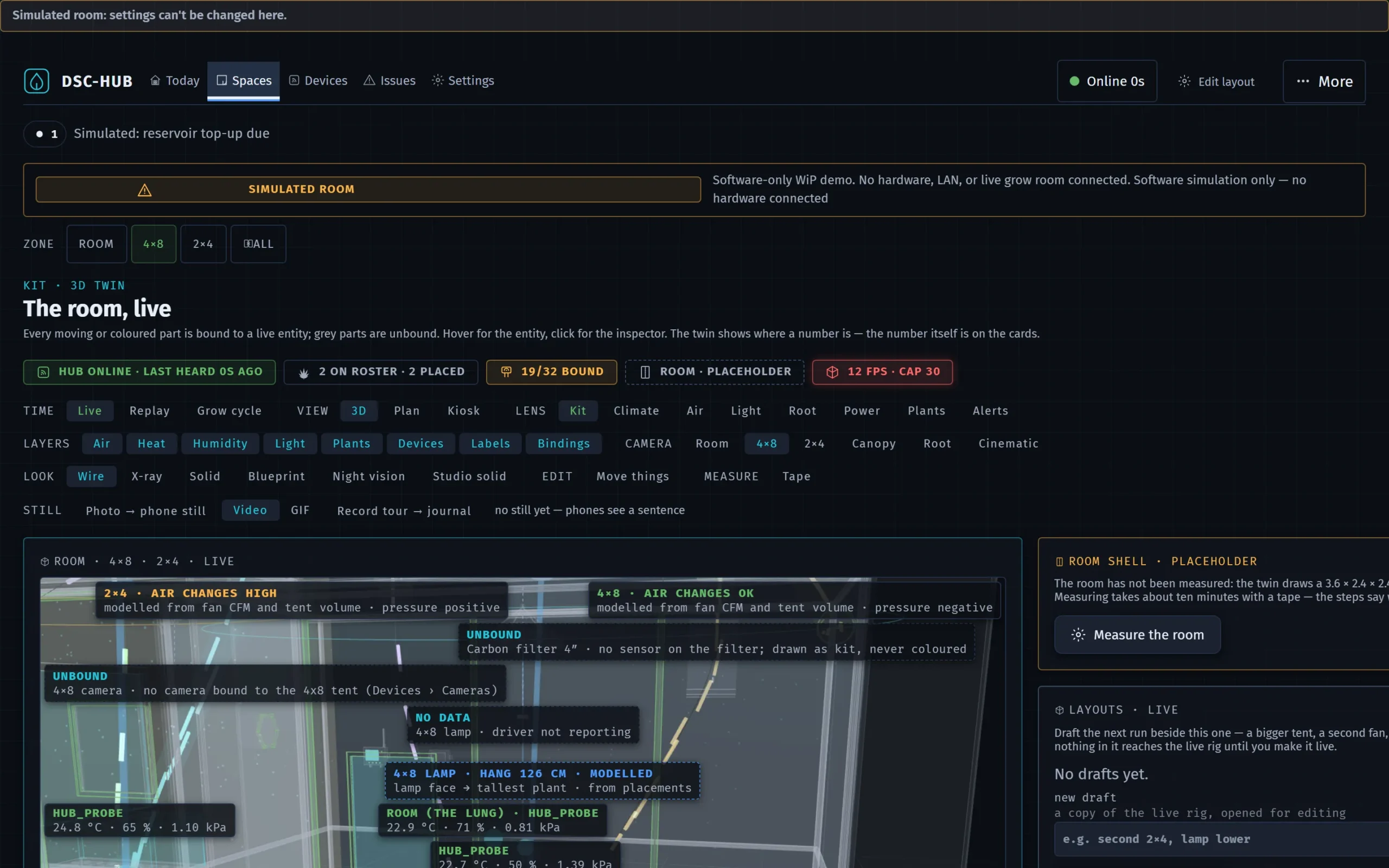
Lenses. A lens is a curated set of layers, a camera, a look and a label policy. Pick one under LENS; toggling a layer or look afterwards marks it edited. The Twin page opens in Kit. Each lens is a deep link: #/twin?lens=air&camera=main.
| Lens | Answers |
|---|---|
| Kit | Every layer, and which parts are live, held, missing or unbound |
| Climate | Is each zone in band? Heat and humidity volumes, pucks and zone readouts |
| Air | Where the air goes: ducts, streaks, fan duty, plus a ring per tent for the air-change band, the flow axis and a pressure arrow (modelled, no number) |
| Light | What the canopy gets: lamp cones, footprints, hang height, and the maker's PPFD map under the lamp at its hang and dimming (modelled) |
| Root | Below the canopy: vessels, probes and moisture |
| Power | What is plugged in and bound: devices, what each draws and how it is controlled |
| Plants | The roster in place: every plant at its stage and day |
| Alerts | What is wrong: active alerts and missing or unbound parts marked where they are |
The PROVENANCE · HOW TO READ THE SCENE panel explains the marks: LIVE, HELD, SIMULATED, RECORDED, MODELLED, INTERPOLATED, DRAFT, NO DATA, MISSING, UNBOUND. Overview, Climate (Climate lens), Root (Root lens) and Kit (Kit lens) carry a small twin with open in twin, which opens this page in the same lens and camera.
Camera and look
Camera presets frame Room, 4×8, 2×4, Canopy or Root; Cinematic turns on a slow auto-orbit that any drag stops. Look switches the shading: Wire (default), X-ray, Solid, Blueprint, Night vision and Studio solid. The colour key explains the tints for the active layers.
Picking
Click a plant, appliance or sensor to open the same entity inspector the cards open (state, last change, history). A switch or lamp offers Turn on / Turn off behind a confirm — the same write the Climate card makes; the scene follows when the hub reports it. In Replay and Grow cycle the inspector is read-only. The BINDINGS list has an Inspect button per row as the keyboard way in. Tent skins, glass, and enclosure trim are see-through for picks so a plant behind a panel wins.
The scene renders with the browser's WebGL. On a narrow screen (640 px or less), with reduced motion, or with no WebGL it shows the phone still — a dated PNG taken on the desktop — with the 2D plan under it, unless Force the 3D twin is on under Settings › System › Developer (or the link carries ?force3d=1; no WebGL cannot be forced).
Phone still
On a desktop Twin: frame the shot, then STILL · Photo → phone still. That stores one PNG on the brain. Phones show that image with its capture time — never a live claim — and the 2D plan below it; with no still yet they get a sentence instead. Take a new photo to replace it.
VIEW · Plan draws the room record top-down with each tent's live temperature, RH and VPD and each pot's probe reading ("held" when stale); pot spots inside a tent are schematic. It is the phone's twin and a desktop choice (#/twin?view=plan). VIEW · Kiosk opens #/twin/kiosk: the twin full-screen, cycling the lenses every 20 s with big zone and hub readouts, read-only; ?lens=air pins one lens, ?every= sets the seconds (8 minimum); Escape or exit leaves. Beside the still button, Record tour → journal records a 20 s camera tour as Video or GIF and files it in the room journal.
What-if
The WHAT IF · PREVIEW ONLY panel lets you move fan duty and lamp sliders, toggle Heater, Humidifier, Dehumidifier, Cool, Heat mat, Clone humidifier, and Add what-if fan (4×8 or 2×4, intake or exhaust, CFM) to see the scene respond. Overrides are drawn as SIMULATED and the header reads SIMULATED · N OVERRIDES · NOT WRITTEN; no temperature or humidity is invented. Reset to live clears them.
Review as a proposal lists the writes the preview would take (change, from → to, the write, what would fight it) and applies them only after Apply — the same writes the Climate and Light cards make, each with its hold. Clear the holds on Climate › Room › Command when you are done. The result is noted in the room journal.
TIME · Replay shows the recorded twin: pick 24 h, 48 h or 7 d, then Play, step, Bookmark, or Clip the window → journal. TIME · Grow cycle scrubs plants by their dates from Sprout through Today to the Harvest window (days after today are projected; climate stays live), with Clip the cycle → journal; it needs a sprout date on the roster. Back to live leaves either.
RULE FROM THE SCENE: Pick sensor and Pick actuator by clicking the scene, set above or below, a threshold and minutes, then Save rule — an ordinary automation rule, disabled unless enable now is ticked. RESPONSE MODEL · MODELLED fits what each actuator did to its zone over the last 3–30 days; SCENARIO · MODELLED steps the 4×8 exhaust-to-outside duty through the next 4, 8 or 12 h (Run scenario). Both are models, never readings. KIT FROM THE CATALOG binds a tent to its KitLib product so it is drawn at its real size.
Placement
What a device does and which zone it serves still comes from Settings › Devices › Assignment and the Zigbee zone/placement fields; placed climate sensors are drawn as markers from those fields. Where a thing stands in the scene is set in the twin and saved to the brain:
| Control | What it does | Use it when |
|---|---|---|
| PLACEMENTS panel › move | Stand a thing on a parent's anchor with an offset, or at a room position, in metres, plus a turn in degrees. Save & move; reset to the scene's place undoes a move. A plant moves as one (pot, plant, probe stake) and a pot dropped within 12 cm of a tent's probe anchor snaps to it. | You know the number ("30 cm off the back wall"), or you are on a phone |
| EDIT · Move things | Click a thing, drag the gizmo (Move, Turn, Lift for wall-mounted kit); release saves. Arrow keys nudge. Overlaps with neighbours and walls show on the label while you drag. Reset and Undo (Ctrl+Z) take a move back. | Roughing a layout in by eye |
| MEASURE · Tape | Click two points in the scene for the distance and Δx / Δy / Δz. The MEASURES panel lists lamp hang height and tent footprint and volume as drawn — geometry, not readings. | Checking a hang height or a gap |
| RUNS panel | Reroute a duct through waypoints, or Add a run (cable, drip line, hose, duct) between two ends; a tape point can be an end or a waypoint. | Recording where ducts and leads really go |
| LAYOUTS panel | New draft from live copies the rig into a draft and opens it; moves, drags and reroutes then land in the draft and the header reads DRAFT · NAME · NOT LIVE. A compare table sets live beside the draft (hang, tent volume, duct lengths, clearance warnings). make live replaces the live placements and duct runs after a confirm; Back to live leaves the draft. | Planning the next run without touching the live rig |
| AIRFLOW MAP panel | Start the walk lays a grid over a tent at canopy height; type each anemometer reading. Readings show as measured markers in the Air lens; every walk is kept. | Checking air movement after a fan move |
Measured room
When the room has been measured, the Twin tag reads ROOM W × D × H M and the shell is built from that record; until then it reads ROOM · PLACEHOLDER and the twin draws a 3.6 × 2.4 × 2.4 m placeholder. In the ROOM SHELL panel, Measure the room walks one step at a time — Size, Door, Windows, Ports, Power & light, Tents, Review — saying how to measure each and flagging what needs fixing on its step. A tent can be stood against a wall from two tape readings (Place the 4×8 / Place the 2×4). Once measured, Edit measurements shows every field at once, and walk through the steps goes back to the guided flow. Save & rebuild (Save anyway & rebuild when something is flagged) writes through the brain. Back to placeholder asks first (Yes, forget the room) and cannot be undone. After measuring, tents move via Placements.
DSC-Brain user guide · Twin desk (3D room) · this page is edited on the site; the Notion original was retired after the mirror